You chase a customer for an overdue bill and the reply comes back: “Which invoice? We thought we were up to date.” Invoices get lost in inboxes, filed under the wrong job, or paid twice while another one sits forgotten. A statement of account fixes that by putting everything on one page: what you billed, what they paid, and what is still open.
This page gives you a free statement of account template in Excel and PDF, explains every field, shows how the running balance and ageing work, and covers when to send one and how to ask a supplier for theirs.
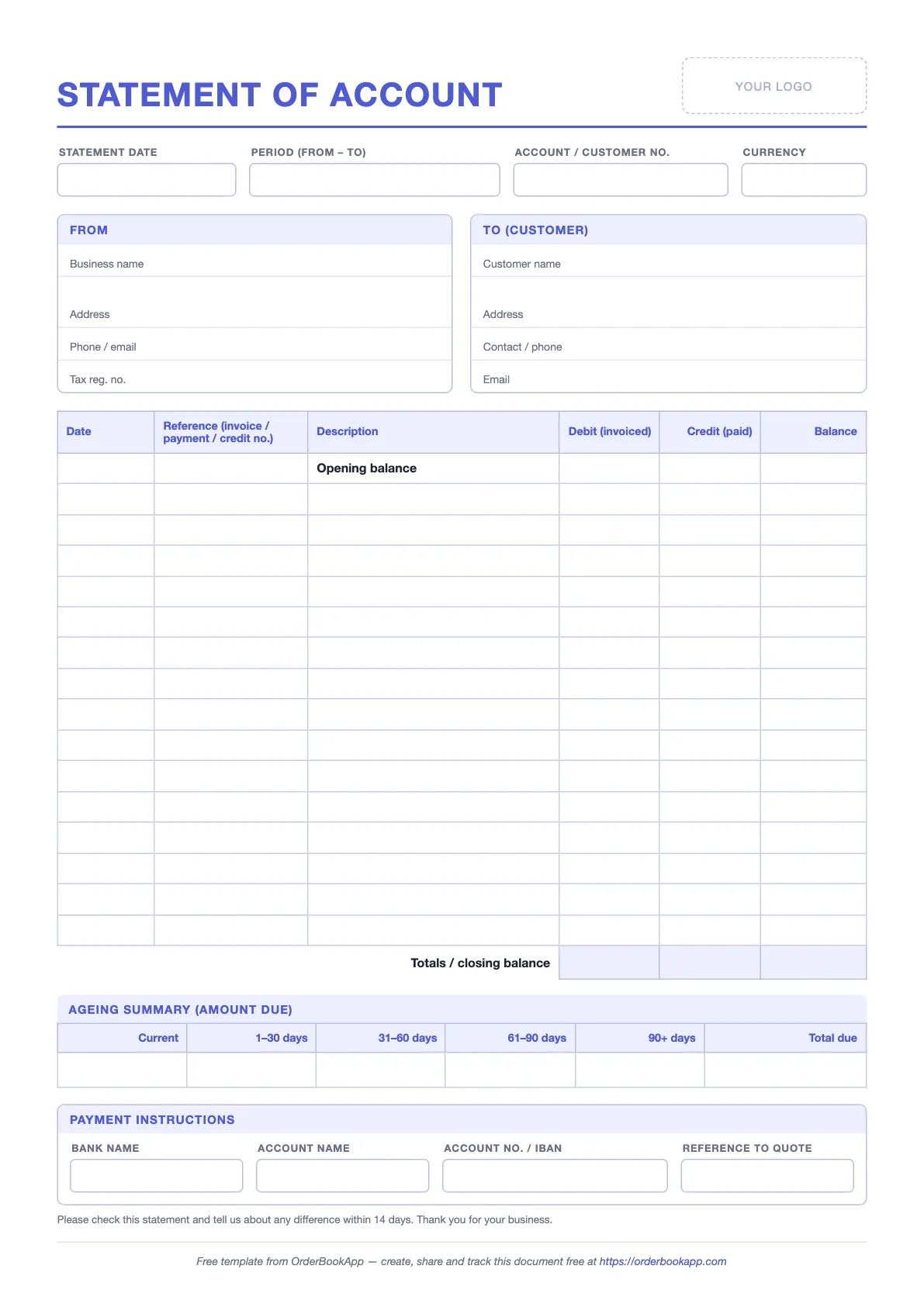
Free statement of account template
No sign-up. Blank form plus a filled-in example sheet.
What a statement of account is
A statement of account is a summary you send a customer listing every invoice, payment and credit on their account over a period, with the balance they owe at the end. It is a business document between a seller and a buyer. It is not a bank statement, although the layout looks similar because both are ledgers with a running balance.
The point is reconciliation. Your customer holds the same transactions in their own books, on the other side. When they compare your statement with their records, any difference shows up straight away: an invoice they never received, a payment you have not matched, a credit note one side forgot. Better to find it on a statement than in a tense phone call three months later.
Statement of account vs invoice
The two get confused because they both show money owed. They do different jobs.
| Invoice | Statement of account | |
|---|---|---|
| Covers | One sale or delivery | Every transaction on the account over a period |
| Shows | Items, quantities, prices, tax, total for that sale | Invoice and payment references, dates, amounts, running balance |
| When it is sent | After each sale or delivery | Monthly, before chasing, or when asked |
| Purpose | Bills the customer for a specific supply | Reconciles the account and shows the total outstanding |
| Tax document? | Usually, yes (a tax invoice where tax applies) | No, it summarises documents already issued |
A statement never replaces an invoice. Every line on it should point back to a document the customer already has. If you want the bigger picture of how orders, deliveries and invoices fit together, see purchase order vs invoice vs GRN.
What to include
Here is every field on the template, what to write in it, and why it is there.
| Field | What to write | Why it matters |
|---|---|---|
| Statement date | The date you prepared it | The balance is only true as of this date. Ageing is counted from it. |
| Period (from – to) | The date range the transactions cover, often one calendar month | Tells the customer which part of their ledger to compare against |
| Account / customer no. | Your reference for this customer | Lets them quote it when they pay, so the payment lands on the right account |
| Currency | One currency per statement | Never add amounts in different currencies together. Send one statement each. |
| From | Your business name, address, phone or email, tax registration number | Who the money is owed to and who to contact about a difference |
| To (customer) | Customer name, address, contact person, accounts email | Statements sent to the site manager rarely reach the person who pays |
| Opening balance | What the customer owed at the start of the period | Carries forward everything older, so the closing balance is the full amount owed |
| Transactions | Date, reference (invoice, payment or credit note number), short description | The reference is what the customer matches against their own records |
| Debit / credit | Invoices in the debit column; payments and credit notes in the credit column | Keeps additions and reductions visually separate and easy to total |
| Balance | The running balance after each line | Shows exactly where the account stood after every invoice and payment |
| Closing balance | Opening balance plus total debits minus total credits | The one number the customer needs to act on |
| Ageing summary | The amount due split into Current, 1–30, 31–60, 61–90 and 90+ days | Shows how old the debt is, which matters more than the total |
| Payment instructions | Bank name, account name, account number or IBAN, reference to quote | Removes the last excuse for not paying today |
The template also carries a line at the bottom asking the customer to report any difference within 14 days. Change the number of days if you like, but keep the line. It invites disputes early, while the paperwork is still easy to find.
How the Excel template works
The Excel file has two sheets. Statement is the blank form. Example is the same form filled in for a fictional building supplier, so you can see the formulas working before you type anything.
The running balance
The simplest running balance formula is the previous balance plus this line’s debit minus this line’s credit. If the opening balance is in F17 and the first transaction is on row 18, that would be =F17+D18-E18, copied down.
The template uses a sturdier version of the same idea. Each balance cell adds the opening balance to all debits so far and subtracts all credits so far:
=IF(AND(D18="",E18=""),"",N($F$17)+SUM(D$18:D18)-SUM(E$18:E18))
Three things are going on. The IF leaves the balance blank on rows you have not used, so the form stays clean when printed. N($F$17) reads the opening balance and treats an empty cell as zero. And because each row sums from the top rather than pointing at the row above, deleting or re-sorting a row does not break the chain.
Totals and closing balance
Under the table, the debit and credit columns are totalled, and the closing balance is worked out the same way: opening balance plus total debits minus total credits. The closing balance should always equal the last running balance in the table. If it does not, a number has been typed over a formula somewhere.
The ageing summary
Ageing splits the amount due by how long it has been outstanding. In the template you type the five buckets yourself and the Total due cell adds them up, which gives you a built-in check: Total due should match the closing balance.
To fill the buckets, take each invoice that is still unpaid (or part-paid), work out how many days past its due date it is on the statement date, and put the unpaid amount in the matching column. Invoices not yet due go under Current. If you want Excel to do the date maths, add a helper column with =MAX(0, statement date − due date) for each invoice and use SUMIFS to total each range. Apply payments to the oldest invoices first unless the customer told you which invoice they were paying.
A worked example
The Example sheet covers 1 August to 30 September 2026. The customer starts with an opening balance of 2,450.00. Then:
| Date | Reference | Debit | Credit | Balance |
|---|---|---|---|---|
| 01 Aug | Opening balance | 2,450.00 | ||
| 04 Aug | INV-1041 | 3,120.00 | 5,570.00 | |
| 12 Aug | PMT-5512 | 2,450.00 | 3,120.00 | |
| 21 Aug | INV-1057 | 1,440.00 | 4,560.00 | |
| 03 Sep | CN-0109 (credit note) | 64.00 | 4,496.00 | |
| 10 Sep | PMT-5560 | 3,000.00 | 1,496.00 | |
| 24 Sep | INV-1073 | 562.50 | 2,058.50 |
The closing balance is 2,058.50. In the ageing summary, the 562.50 invoice from 24 September is not due yet, so it sits under Current. The remaining 1,496.00 is what is left of the two older August invoices, now past their due dates, so it sits under 1–30 days. Current plus 1–30 days gives a Total due of 2,058.50, the same as the closing balance. That match is the check you are looking for every time.
How to fill it in, step by step
- Pick the period. A calendar month is easiest for both sides to compare.
- Enter the opening balance: the closing balance from your last statement to this customer, or what they owed on the first day of the period.
- List every invoice, payment and credit note in date order. Use the exact reference numbers on the documents, not your own shorthand.
- Check that the closing balance matches what your books say this customer owes.
- Fill the ageing buckets and check that Total due equals the closing balance.
- Add payment instructions and the reference you want quoted, then save as PDF and send it to the person who actually pays the bills.
When to send a statement
Monthly. Send one to every customer with an open balance, at the same time each month. A regular statement becomes part of their routine, and their accounts team will start reconciling against it.
Before you chase. A reminder that says “please see the attached statement” lands better than one that names a single invoice the customer may not have. If you need words for the reminder itself, there are ready-made versions for every stage in payment reminder messages.
On request. Customers ask for statements at their year end, before an audit, or when a new person takes over their accounts. Answer quickly. A customer reconciling their books is a customer getting ready to pay.
Requesting a statement from your supplier
The same document works in the other direction. When you are the buyer, asking your suppliers for a statement is the fastest way to catch an invoice you never received, or a payment they have not matched to your account, before it turns into a late fee or a held delivery. A short email is enough:
Subject: Request for statement of account, {your business name}
Hello {name},
Could you please send us a statement of account for {your business name}, account no. {account number}, covering {start date} to {end date}? Please include the opening balance, all invoices, payments and credit notes in the period, and the closing balance.
We are reconciling our records and want to make sure everything matches. If you can send it by {date}, that would be a great help.
Thank you,
{your name}
{phone}
When it arrives, tick each line against your own records: their invoices against what you received, their payment lines against your bank. If you already check bills before paying them, as described in three-way matching, this takes minutes, because every invoice on the statement should already have a matched order and delivery on your side.
Common mistakes
- No opening balance. Without it, the closing balance only covers this month, and older unpaid invoices quietly drop off the page.
- Mixing currencies. A statement that adds dollars to euros shows a number nobody owes. One currency per statement.
- Vague references. “Goods – August” cannot be matched to anything. Use the invoice, payment or credit note number every time.
- Missing credit notes. If you issued a credit for damaged or returned goods and left it off, your statement is higher than the customer’s records and the conversation starts with an argument.
- Overwriting formulas. Typing a number into the balance column breaks the chain for every row below it. If the closing balance and the last running balance disagree, look for this first.
- Ageing that does not add up. If Total due differs from the closing balance, a payment has been left out of the ageing or put against the wrong invoice.
- Sending it to the wrong person. Address it to accounts payable, not the person who placed the order.
Doing this without paper
A spreadsheet statement is only as good as the copying that goes into it. Every invoice and payment has to be typed in again, and one missed line throws the balance off. If your invoices and payments are already recorded against your orders, the statement can build itself. That is how it works in OrderBookApp, where statements are free on every plan.
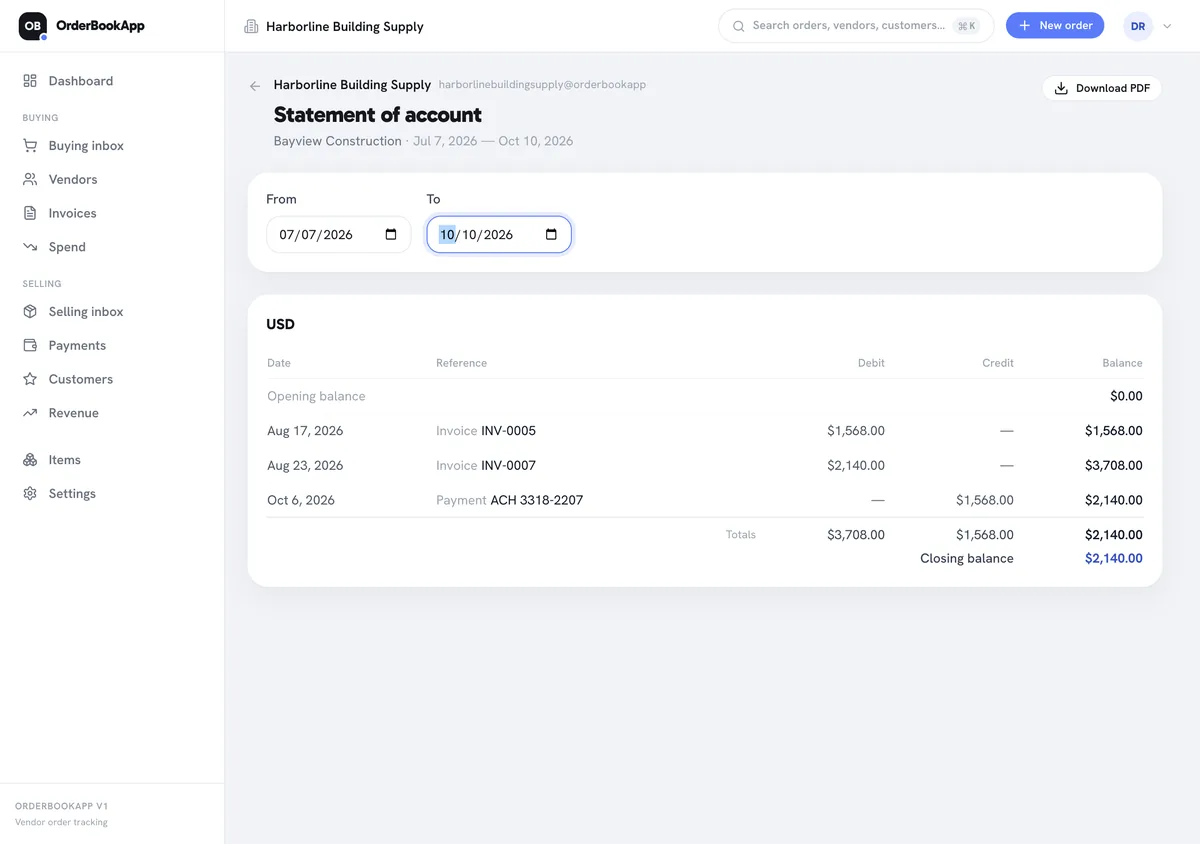
Open a customer, tap Statement, and choose a date range. Anything before the start date rolls into the opening balance. Each invoice and payment is listed in date order with its reference and the running balance after it. Here, Harborline Building Supply’s statement for Bayview Construction shows invoices INV-0005 and INV-0007, one payment with reference ACH 3318-2207, and a closing balance of $2,140.00. If a customer is billed in more than one currency, each currency gets its own table and they are never added together.
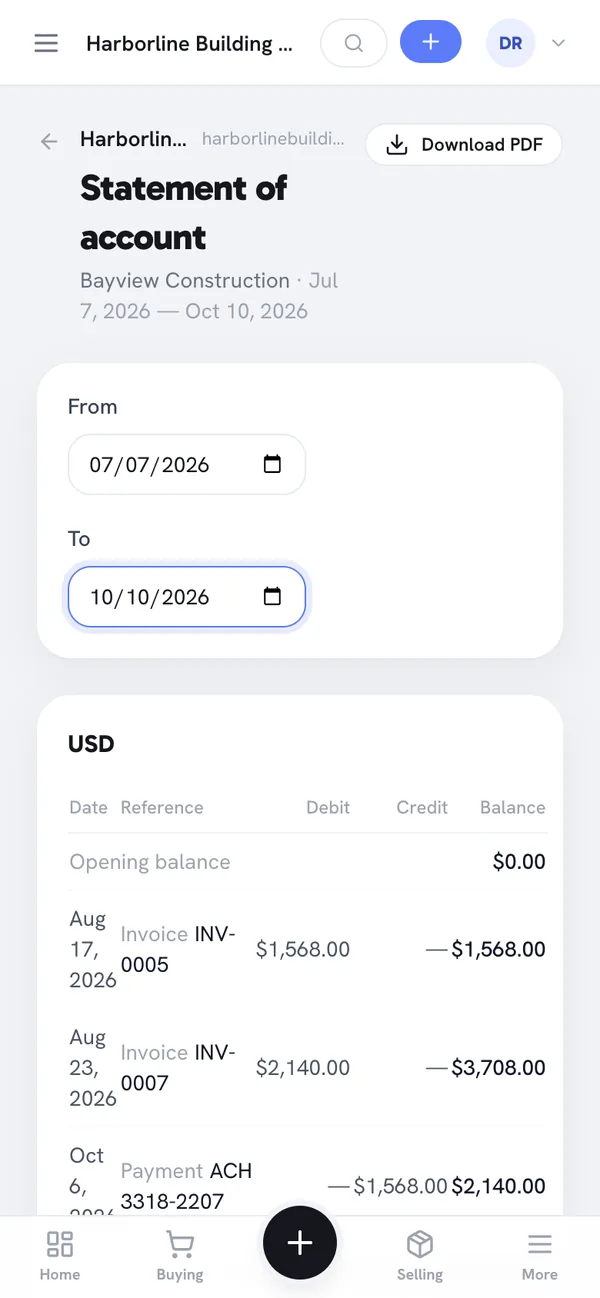
It works the same on a phone, which helps when a customer asks “what do we owe you?” and you are not at a desk. Statements also work from the buying side: open a vendor instead of a customer and you get the statement of what you owe them.
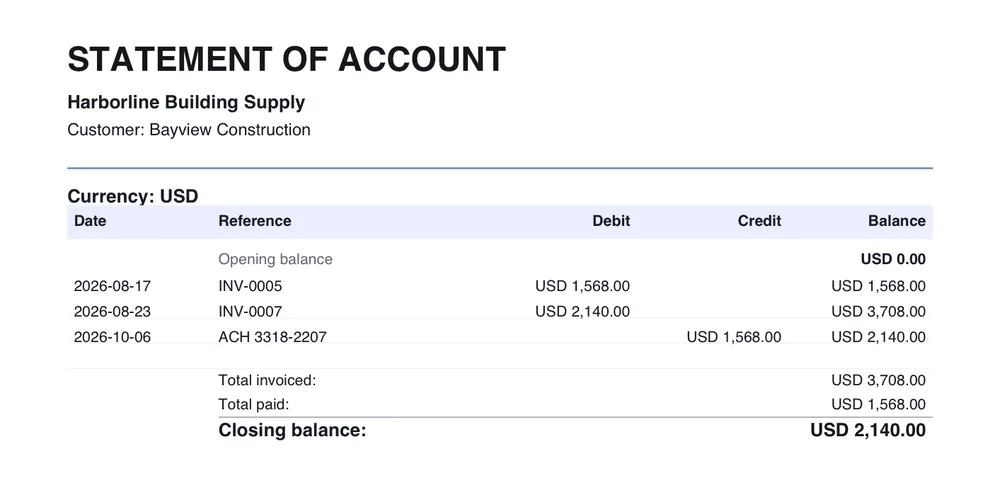
Download PDF produces a clean one-page document with the opening balance, each line, total invoiced, total paid and the closing balance. One honest limit: the in-app statement does not include an ageing table. The Payments screen splits each customer’s outstanding amount into overdue and not yet due; when a customer needs the full 30/60/90-day breakdown, use the template above.
Frequently asked questions
What is the difference between a statement and an invoice?
An invoice bills a customer for one sale, with items, prices and tax. A statement of account lists every invoice, payment and credit note on the customer’s account over a period, with a running balance and the total still owed. The statement summarises invoices; it never replaces them.
How often should I send a statement of account?
Once a month to every customer with an open balance is the usual rhythm, sent on the same day each month. Also send one before you chase an overdue payment, and whenever a customer asks for one, for example at their year end.
What is an opening balance?
The opening balance is what the customer owed you on the first day of the statement period. It carries forward everything from earlier periods, usually the closing balance of your last statement, so the closing balance at the bottom is the full amount owed and not just this month’s activity.
Is a statement of account a demand for payment?
Not on its own. A statement is a summary that asks the customer to check their records and pay what is due. The amounts are owed because of the invoices it lists, not because of the statement. If you need a formal demand, for example before taking legal steps, the rules differ from country to country, so check with your accountant or lawyer.
How do I request a statement of account from a supplier?
Email their accounts team with your business name, your account number with them, the period you need, and a date you would like it by. Ask for the opening balance, every invoice, payment and credit note in the period, and the closing balance. Then tick each line against your own records.