The driver drops twelve boxes at the site gate, someone waves him off, and nobody signs anything. A week later the customer’s accounts team writes: “We only got eight. Please send a corrected invoice.” You are fairly sure you sent twelve. You cannot prove it.
A delivery note is the one-page fix for that conversation. It goes with the goods, lists what is in the vehicle, and comes back signed. Below you will find a free template in Excel and PDF, what each field is for, how to handle part-deliveries, and the mistakes that make a delivery note useless when you actually need it.
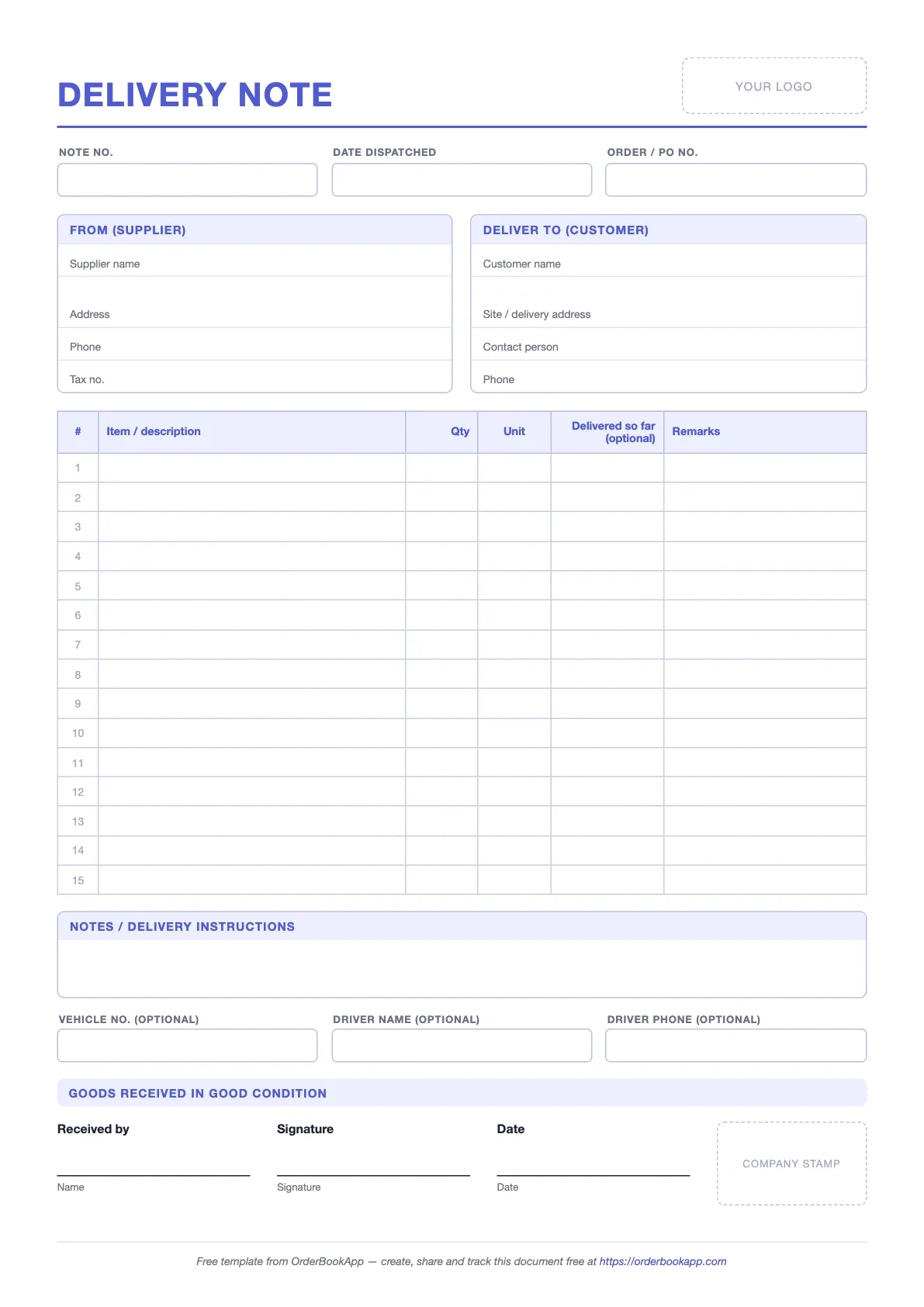
Free delivery note template
No sign-up. Blank form plus a filled-in example sheet.
What a delivery note is (and is not)
A delivery note is the supplier’s document. You, the seller, write it before the goods leave. It travels in the vehicle with the goods, and the person who receives them signs a copy to say they arrived. That signed copy is your proof of delivery.
It lists items and quantities. It does not list prices. That is deliberate. The people who handle a delivery note are drivers, warehouse staff, site supervisors and receptionists. None of them need to know what the customer is paying you, and some of them should not. The price lives on the invoice, which goes to the people who pay it.
It is also not a request for payment, not a tax document in most places, and not the customer’s own record of what arrived. That last one is the goods received note, which the buyer writes for themselves. The two are meant to be compared.
Delivery note vs invoice vs GRN
Three documents describe the same delivery from different angles. Who writes each one is the whole difference.
| Document | Who issues it | When | Prices? | What it proves |
|---|---|---|---|---|
| Delivery note | Supplier | When the goods are dispatched | No | What was sent, and (once signed) that it was received |
| Invoice | Supplier | At or after dispatch or delivery | Yes | What the customer owes, and by when |
| Goods received note (GRN) | Customer | When the goods arrive | Usually no | What the customer counted and accepted |
If you buy as well as sell, you will see all three from both sides. For how they fit together on one order, see purchase order vs invoice vs GRN. If you are on the receiving end and want the buyer’s version of this page, there is a free goods received note template too.
What to include on a delivery note
Every field below is on the template. None of them are decoration: each one closes a gap that someone will otherwise argue about later.
| Field | What to write | Why it matters |
|---|---|---|
| Note number | A unique number, e.g. DN-1042, or the order number with a prefix | Lets both sides refer to this exact delivery, not just “the one last week” |
| Date dispatched | The day the goods left you | Settles “when did you send it?” and shows how long transit took |
| Order / PO number | The customer’s purchase order number, plus your own order number | Their receiving team matches deliveries to POs, not to your company name |
| From (supplier) | Your business name, address, phone, tax number if you have one | Tells the receiver who sent it, and who to call if something is wrong |
| Deliver to (customer) | Customer name, the actual site or delivery address, a contact person and phone | The billing address is often not where the goods go. The driver needs the site. |
| Items | Description in the same words as the order, quantity, and unit (bag, box, m, kg) | “120” means nothing without the unit. Matching wording makes checking quick. |
| Delivered so far | For part-deliveries: the running total delivered, including this load | Shows both sides what is still outstanding without digging through old notes |
| Remarks | Per-line notes: “balance to follow”, “substitute colour agreed” | Explains a short or changed line before anyone has to ask |
| Notes / delivery instructions | Gate number, unloading times, “call on arrival” | Saves a wasted trip and a second delivery charge |
| Vehicle and driver (optional) | Registration number, driver name and phone | Useful for site security and for tracing a load that went missing |
| Received by, signature, date, stamp | Filled in by the customer on arrival: printed name, signature, date, company stamp | This is the part that makes the note proof. Without it, it is just a packing list. |
How to fill it in, step by step
- Start from the order, not from memory. Copy the item descriptions and units from the customer’s purchase order so the two documents read the same.
- Write what is actually on the vehicle. If the order is for 120 bags and you are loading 100, the note says 100. A note written from the order instead of the pallet is how disputes start.
- Make two copies. One stays with the customer. The other comes back with the driver, signed. If you use the PDF, print two. If you use Excel, save each note as its own file named by note number.
- Ask for a printed name as well as a signature. A squiggle on its own identifies nobody six weeks later.
- Let the receiver write on it. If they count 98 bags, they should write 98 next to the line and the driver should initial it. Better to know at the gate than from an email next month.
- File the signed copy against the order. Photograph it before the driver leaves the site if you can. Then raise the invoice for what was signed for.
Partial deliveries
Sending an order in more than one load is normal. Stock runs short, a truck fills up, the customer’s site can only take half this week. The rule is simple: one signed copy per load. Each load leaves with its own copy of the note, dated for that dispatch, and comes back with its own signature.
The “Delivered so far” column is what keeps several copies readable. Say the order is 120 bags of cement and 45 boxes of tiles. The first load carries 100 bags and 40 boxes. The note shows Qty 120 / Delivered so far 100 for the cement, and 45 / 40 for the tiles. The copy for the second load, with the balance, shows 120 / 120 and 45 / 45. Anyone picking up either copy can see where the order stands without finding the other one.
Use the Remarks column to say what is coming: “20 bags to follow Thursday”. If the balance is never going to come, say so in writing and invoice only what was signed for.
Regional notes
The idea is the same everywhere: a list of what was sent, signed on arrival. The names and the paperwork that sits around it vary. Tax rules change, so treat this as orientation and check with your accountant for anything that affects your filings.
UAE and the Gulf
Customers here usually issue a local purchase order (LPO), and the delivery note is expected to quote the LPO number. Receiving teams often will not accept a delivery, or process the invoice, without it. The VAT invoice is a separate document. The delivery note itself carries no prices and no tax amounts. A signed and stamped delivery note is commonly asked for before an invoice is paid.
India: the delivery challan
In India the everyday word is “challan”, and it covers two things. Day to day, people call any delivery note a challan. Under GST there is also a specific delivery challan, set out in Rule 55 of the CGST Rules, used when goods move without a tax invoice: for example, goods sent for job work, goods sent on approval, or goods moving for reasons other than a sale. The rule specifies what that challan must contain and how many copies to make. When goods do move with a tax invoice, a separate delivery note is still useful for the signature, but it is the invoice that the tax paperwork relies on.
UK, Europe, US, Australia and New Zealand
In the UK and Ireland, “delivery note” is the standard term, and most of Europe uses a direct equivalent. In the US you will more often see a “packing slip”: a list of contents that goes inside or on the package. It does the same listing job, but it is not always signed, so if you need proof of delivery, ask for a signature on a copy. In Australia and New Zealand the same document is often called a “delivery docket”. Similar, not identical: check which version your customer expects to sign.
Common mistakes
- Putting prices on the note. Every driver, storeman and site hand who touches it can then read your pricing. Keep prices on the invoice.
- No order reference. A note that only says “12 boxes” and your company name sits in the customer’s receiving tray unmatched, and so does your invoice.
- Unsigned copies. A delivery note nobody signed proves you printed it, not that anyone received it. If the site is unattended, say so on the note and photograph the goods where you left them.
- One signature for several part-deliveries. Adding the second load to a copy that was already signed, or getting one signature for three trips, makes it impossible to say which load was short. One load, one signed copy.
- Writing the note from the order, not the load. If the note says 120 and the truck carries 100, the customer has signed for goods they never got, and you will not be thanked for it.
- Losing your copy. A signed note in the driver’s cab, in a shoebox or in someone’s photo roll is almost as bad as none. File it against the order the same day.
Doing this without paper
The template works. The weak spot is the last step: the signed copy has to find its way back to you, and the customer has to be able to find theirs. If your orders already run through OrderBookApp, the delivery note is made from the order once you mark it as sent, and both sides can open the same note from the order.
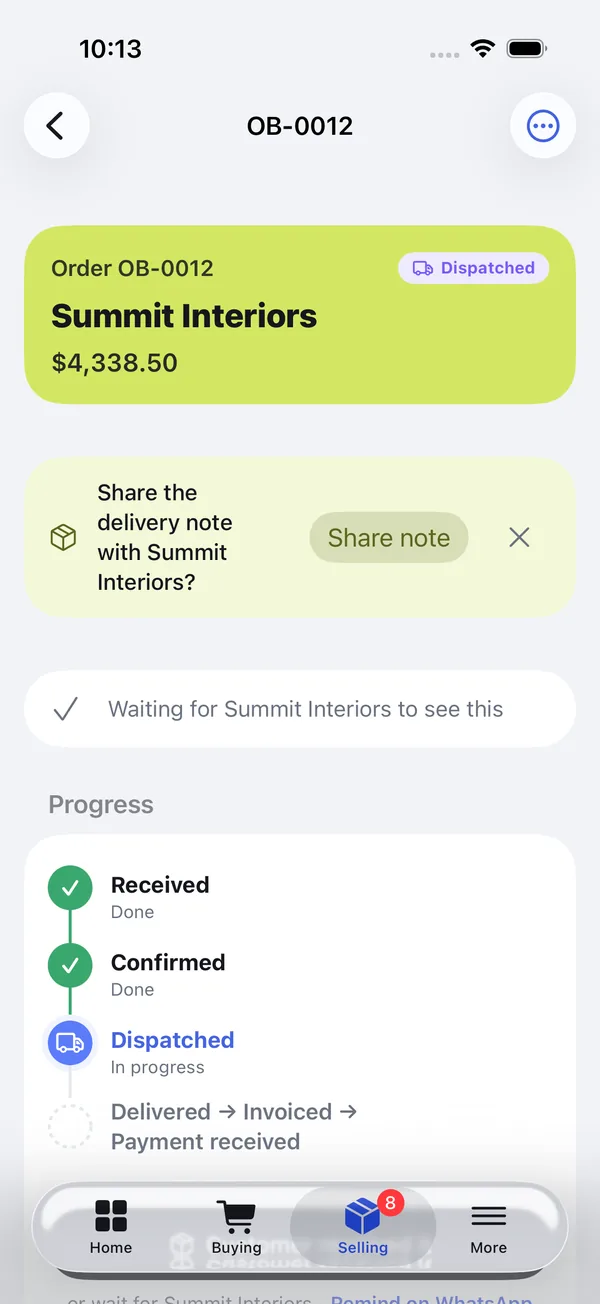
When the seller marks an order as sent, a one-time banner asks whether to share the delivery note with the customer. It can be dismissed, and it does not block anything. The note is numbered from the order (order OB-0012 gets note DN-OB-0012) and it is available on the order from Dispatched onward.
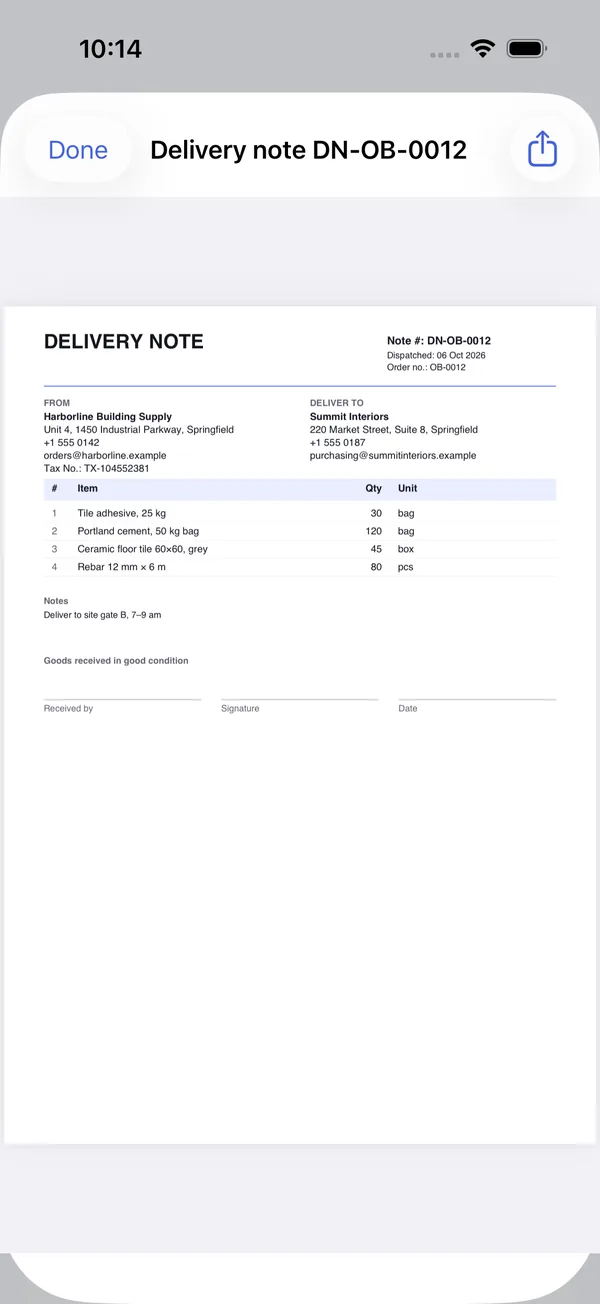
The note carries the same fields as the template above: note number, dispatch date, order number (and the PO number, if the order has one), both addresses, items with quantity and unit, the order notes, and a Received by / Signature / Date block. There are no prices on it, so it is safe to hand to a driver. The seller can share it through their own WhatsApp or email. The WhatsApp message that goes with it reads:
Hello Summit Interiors,
Order #OB-0013 is on its way. Please find delivery note DN-OB-0013 for it — please sign it when the goods arrive.
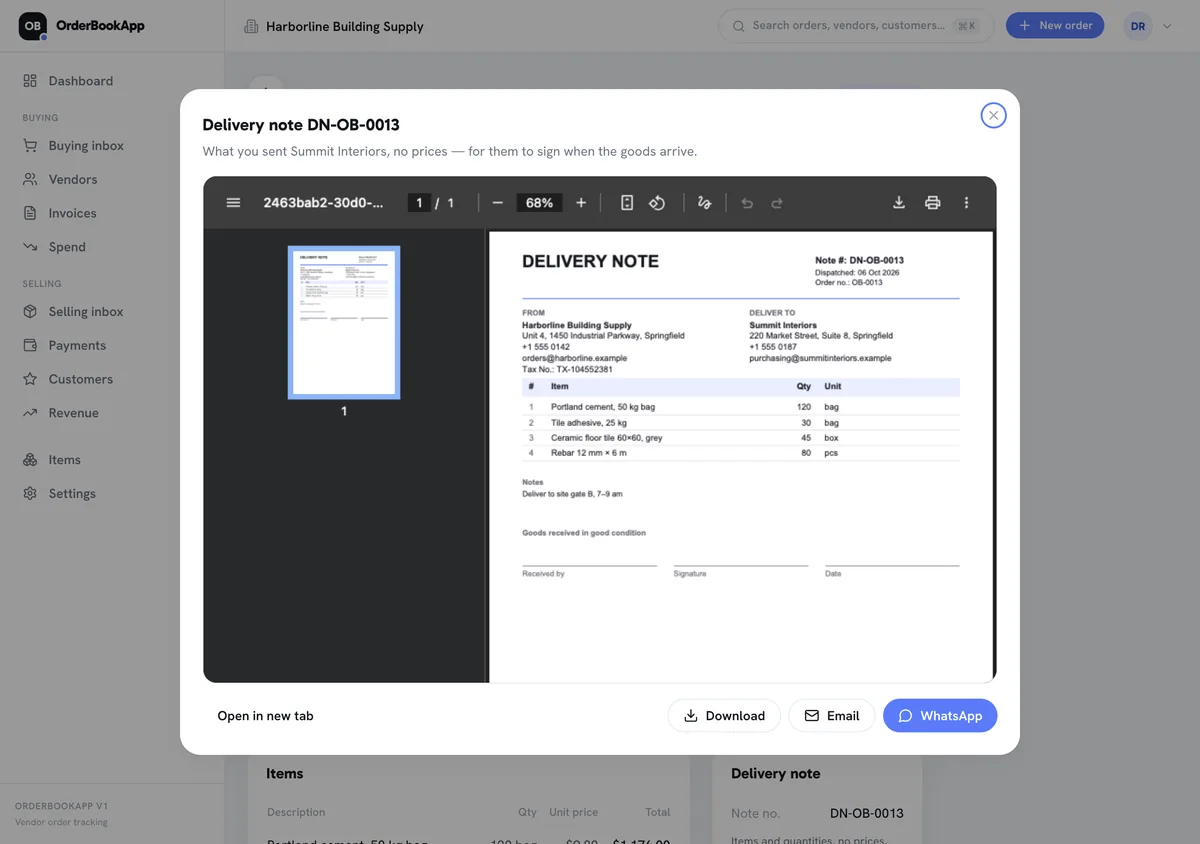
On a computer the note opens in a preview with Download, Email and WhatsApp buttons. The PDF downloads and your mail app or WhatsApp opens with the message ready, so you attach the file and press send. It goes from your own account, not from ours.
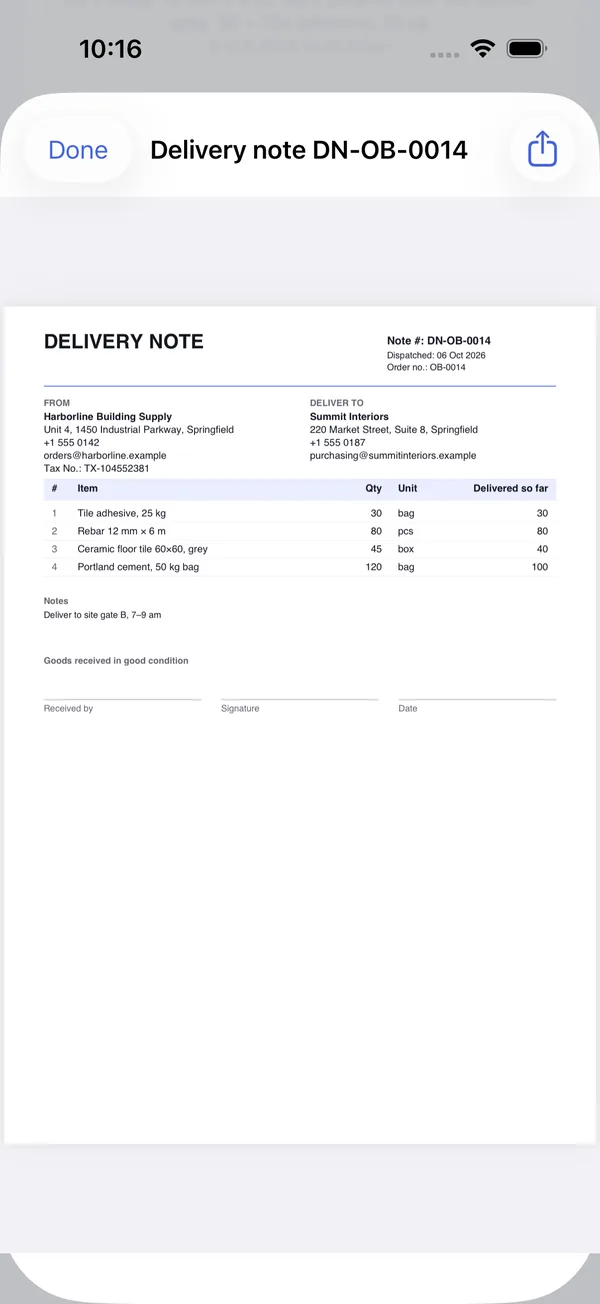
The customer sees the same note from their side of the order, as long as the supplier is on OrderBookApp too. On a partly delivered order the note adds a “Delivered so far” column, so 100 of 120 bags is there in writing. The app keeps one note number per order and updates that column as deliveries are recorded, so you share a fresh copy with each load and every trip still gets its own signature. This is the honest point of doing it this way: if the paper copy goes missing at the gate, nobody has to argue about whether a note existed. Both sides open the same one. You still want a signature on arrival; the app gives you the document, not the count.
Whichever way you do it, the delivery note is the supplier’s half of the check. The customer’s half is their own count, and the two together are what three-way matching uses before an invoice gets paid.
Frequently asked questions
Does a delivery note need prices?
No, and it is better without them. The note is handled by drivers, storemen and site staff who do not need to see your pricing. Prices and tax belong on the invoice, which goes to the people who pay it. Some businesses print a priced copy for their own records, but the copy that travels with the goods should list items and quantities only.
Who signs the delivery note?
The person who receives the goods at the customer’s end: the storekeeper, site supervisor or whoever is at the gate. They should print their name, sign, date it and, where the business uses one, stamp it. The driver keeps the signed copy for the supplier. If the receiver counts a different quantity, they write the real figure on the note and the driver initials it.
Is a delivery note the same as a delivery challan?
In everyday use, often yes: in India and nearby, “challan” is the common word for a delivery note. Under India’s GST rules, though, a delivery challan is also a specific document used when goods move without a tax invoice, for example for job work or goods sent on approval, and it has its own required contents. If that is your situation, follow the GST format.
Can a delivery note be digital?
Yes. A PDF sent by WhatsApp or email does the same job as a printed note, as long as you can show it was received: a signature on a printed copy, a signed photo, or a written acknowledgement from the customer. Many businesses send the PDF ahead of the goods and print one copy for the driver to get signed.
What is a delivery note number?
A unique reference for one delivery, so both sides can point to it exactly. It can be a simple running sequence (DN-1001, DN-1002) or built from the order number. If you send an order in several loads, each load needs its own number, for example with a suffix (DN-1001-1, DN-1001-2). Never reuse a number.