In the Gulf, and in much of East and West Africa and South Asia, the first thing a supplier says after quoting you is “send the LPO”. No LPO, no delivery. Until the supplier has that document, your order is a conversation, not a commitment. This page explains what an LPO is, what goes on one, and how it moves from quotation to payment. It also gives you a free template in Excel and PDF, with VAT and tax registration fields already in place.
What an LPO is
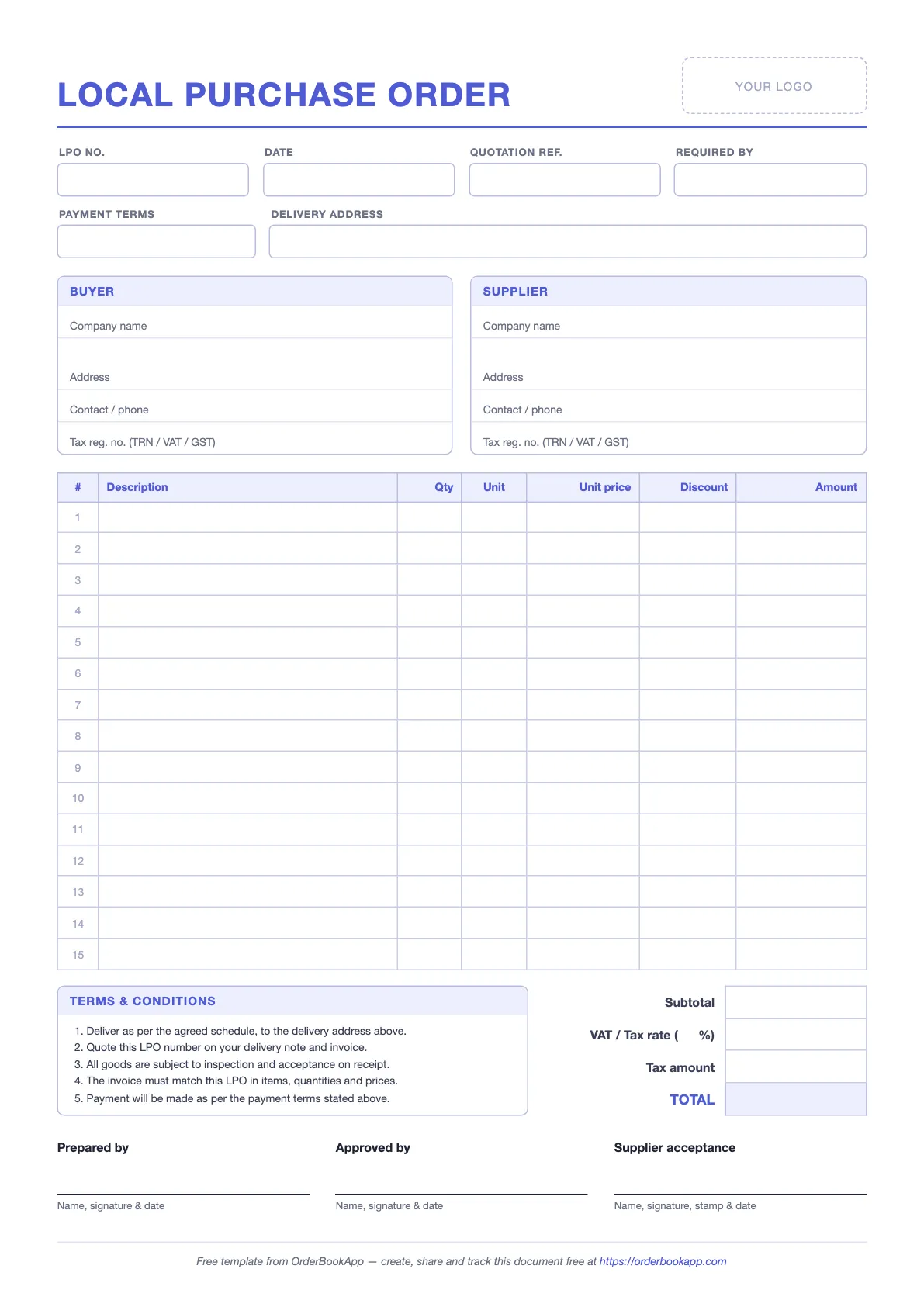
LPO stands for local purchase order. It is a written order from a buyer to a supplier that says exactly what you want, how many, at what price, where it should go, by when, and on what payment terms. You issue it. The supplier works from it.
The LPO usually comes after a quotation. The supplier quotes, you check the price, and the LPO turns that quote into a firm order. Once the supplier accepts it, both sides have the same written record of the deal. Later, the delivery note and the tax invoice should both quote the LPO number. That single number is what ties the whole purchase together.
Think of it as the buyer’s half of the paperwork. The supplier writes the quotation, the delivery note and the invoice. You write the LPO. If the invoice ever disagrees with what you agreed, the LPO is your evidence.
LPO vs purchase order
Short answer: they are the same document. An LPO is a purchase order. The word “local” simply means the supplier is in the same country as you, as opposed to an import order placed with an overseas supplier, which brings customs, shipping terms and letters of credit along with it.
In practice the name has outgrown that distinction: plenty of businesses that never import anything still call every purchase order an LPO. If a supplier asks for an LPO and you send a document titled “Purchase Order”, they will accept it, as long as it has the right details on it.
For years many offices kept a printed LPO book: numbered, carbon-copied pages torn out and handed to the supplier, with the copy staying in the book. Those books are slowly being replaced by PDFs sent on email or WhatsApp. The format hasn’t changed much. Only the paper has gone.
What to include on an LPO
Every field below has a job. If you leave one out, you will usually find out why it was there at the worst possible moment, normally when the invoice arrives.
| Field | What to write | Why it matters |
|---|---|---|
| LPO number | A unique number from one running sequence, e.g. LPO-2026-041 | The delivery note and invoice quote it. It’s how you match everything later. |
| LPO date | The date you issue it | Fixes when the order was placed and which prices applied. |
| Buyer details | Legal company name, address, contact person, phone | The invoice must be made out to the right legal entity. |
| Buyer TRN / tax number | Your VAT or tax registration number | The supplier needs it on the tax invoice so you can reclaim input VAT. |
| Supplier details | Supplier’s legal name, address, phone | Makes clear which company is bound by the order. |
| Supplier TRN / tax number | The supplier’s VAT or tax registration number | Lets you check later that the tax invoice comes from the same registered business. |
| Quotation reference | The supplier’s quote number and date | Locks the agreed prices and terms to this order. |
| Item lines | Description, quantity, unit, unit price, line total | Use the same wording as the quote, so the invoice can be checked line by line. |
| Subtotal, VAT and total | Amount before tax, the VAT rate and amount, the grand total | Shows the supplier exactly what you expect to be billed. |
| Required-by date | The date the goods must arrive | Gives you a fair basis to chase, or cancel, a late order. |
| Delivery address | Site or warehouse, gate, contact on arrival, delivery hours | Billing address and delivery address are often different, especially on project sites. |
| Payment terms | e.g. 30 days from invoice, 50% advance, cash on delivery | Settles “when do we get paid?” before it becomes an argument. |
| Approvals | Prepared by, approved by, signature, company stamp | Shows the order was authorised, not raised by one person on a whim. |
| Supplier acceptance | Supplier name, signature, stamp and date | Proves the supplier agreed to these quantities, prices and dates. |
The free template above has every one of these fields. The Excel version works out line totals, VAT and the grand total, so you only type quantities, prices and the tax rate.
How to fill in an LPO, step by step
- Start from the quotation. Copy the item descriptions, units and prices exactly as quoted, and write the quote number in the quotation reference field. If you negotiated a different price, put the new price on the LPO and mention it in the notes.
- Take the next number in your sequence. Never reuse a number and never skip one without writing down why. A gap in the sequence is the first thing an auditor asks about.
- Fill in both tax numbers. Yours and the supplier’s. Get the supplier’s from their quote or their trade documents, not from memory.
- Set the VAT rate for your country. If the supplier isn’t VAT registered, put 0 and say so in the notes.
- Write a real required-by date and a full delivery address. “ASAP” is not a date. “Site” is not an address. Add the gate, the hours and the person to call.
- State the payment terms. Even if they are the same as always. Terms that are written down are terms nobody can “forget”.
- Get it approved and signed. Whoever is allowed to commit your money signs and stamps it before it goes out.
- Send it and get it acknowledged. Ask the supplier to sign and return it, or at least reply in writing that they accept it. File the accepted copy against the order.
How the LPO flows from quotation to payment
An LPO is the second document in a chain of six. Each later document should quote the LPO number, which is the whole reason the number exists.
- Quotation from the supplier: prices, validity, terms.
- LPO from you: the firm order, quoting the quotation number.
- Supplier acceptance: a signed copy, a stamp, or a written “accepted”. Now both sides are committed. (If suppliers are slow to reply, see how to get suppliers to confirm orders.)
- Delivery note from the supplier: travels with the goods, quotes the LPO number, gets signed by whoever receives them. See the delivery note format and template.
- Tax invoice from the supplier: quotes the LPO number and the delivery note numbers it covers.
- Payment from you, but only after the invoice matches the LPO and what was actually delivered.
That last check, comparing the order, the delivery and the invoice before you pay, is called three-way matching. The LPO is the first of the three. If it is vague, the check has nothing firm to compare against.
Regional notes
The LPO format is the same everywhere it is used. What changes is the tax line and what the tax registration number is called. Rates below are as of 2026. Tax rules change, so check with your accountant before relying on them.
The Gulf
- United Arab Emirates: VAT is 5%. Put your TRN (the 15-digit tax registration number) and the supplier’s on the LPO.
- Saudi Arabia: VAT is 15%. Include both VAT registration numbers.
- Oman: VAT is 5%. Include both VAT numbers where the supplier is registered.
- Bahrain: VAT is 10%. Include both VAT numbers.
- Qatar and Kuwait: check the current rules before adding a tax line, as the position on VAT there may have changed.
Africa
- Kenya: “LPO” is the everyday term in both government and private buying. Put both KRA PINs on it and check the current VAT rate.
- Nigeria: LPOs are standard for contractors and government suppliers. Include both tax identification numbers and check the current VAT rate.
- Ghana: “LPO” is widely used. VAT there comes with extra levies, so check with your accountant how the tax line should read.
Common LPO mistakes
- No number sequence. Numbers typed by hand, reused or skipped. Then the supplier’s invoice quotes “LPO 112” and you have two of them.
- Unsigned or unstamped. Some suppliers, and most auditors, won’t treat an unsigned LPO as authorised. It also lets anyone in the office commit your money.
- Amended by phone. The quantity changes on a call, nobody updates the LPO, and the invoice follows the call. If anything changes, issue a revised LPO, e.g. LPO-2026-041 Rev 1, and send it again.
- No acceptance. You sent it, the supplier never acknowledged it, and three weeks later they say they never saw it. An LPO nobody accepted is just a request.
- Missing tax numbers. The supplier copies your details from the LPO onto the tax invoice. If your TRN isn’t on the LPO, it may not be on the invoice either.
- Vague items. “Tiles, 45” instead of “Ceramic floor tile 60×60, grey, 45 boxes”. You can’t check an invoice against something that vague.
Doing this without paper
The template works fine on its own. If you would rather not keep a numbered file of PDFs and chase acknowledgements by hand, this is how the same steps work in OrderBookApp. The app calls the document a purchase order. It is the same document many Gulf businesses call an LPO, and it prints both the buyer’s and the supplier’s tax numbers.
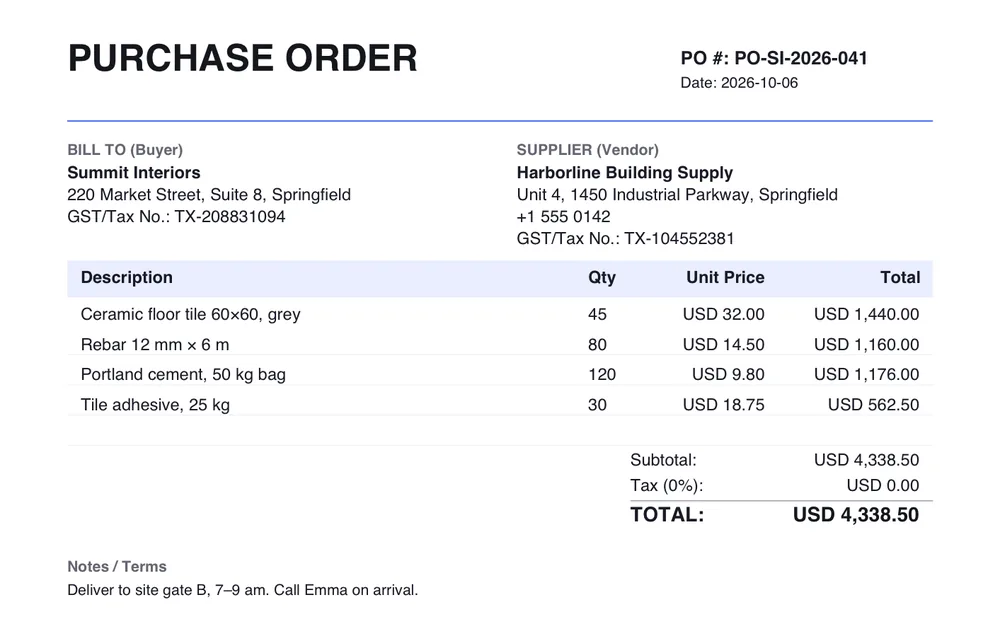
You create the order with its items, then generate the purchase order. You set the PO number, currency and tax percentage. The tax line in this example is 0%; a UAE buyer would set 5%. Your tax number and the supplier’s are filled in from what you have saved, and anything you type under notes, such as delivery gate and hours, is printed at the bottom.
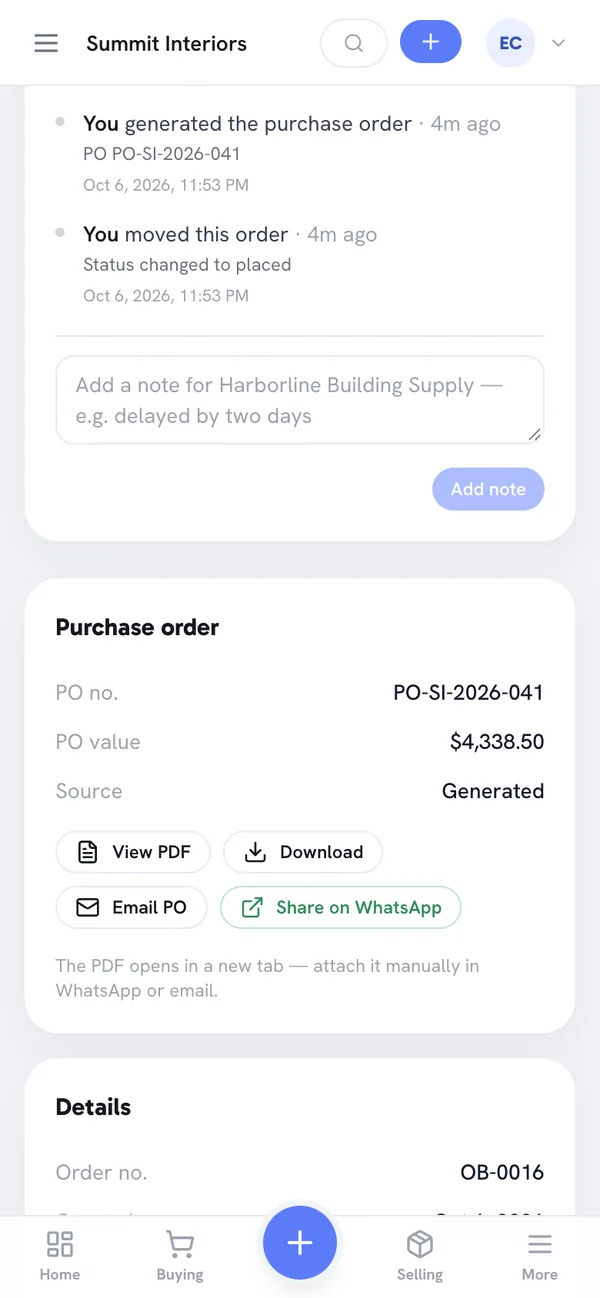
The PO sits on the order itself, so it is never lost in a downloads folder. “Share on WhatsApp” opens a chat with the supplier with a message already written, like “Hi Harborline Building Supply, sharing the purchase order PO-SI-2026-041. Please find the PDF attached.” You attach the PDF yourself. “Email PO” uses your own email app, so the email comes from your own address.
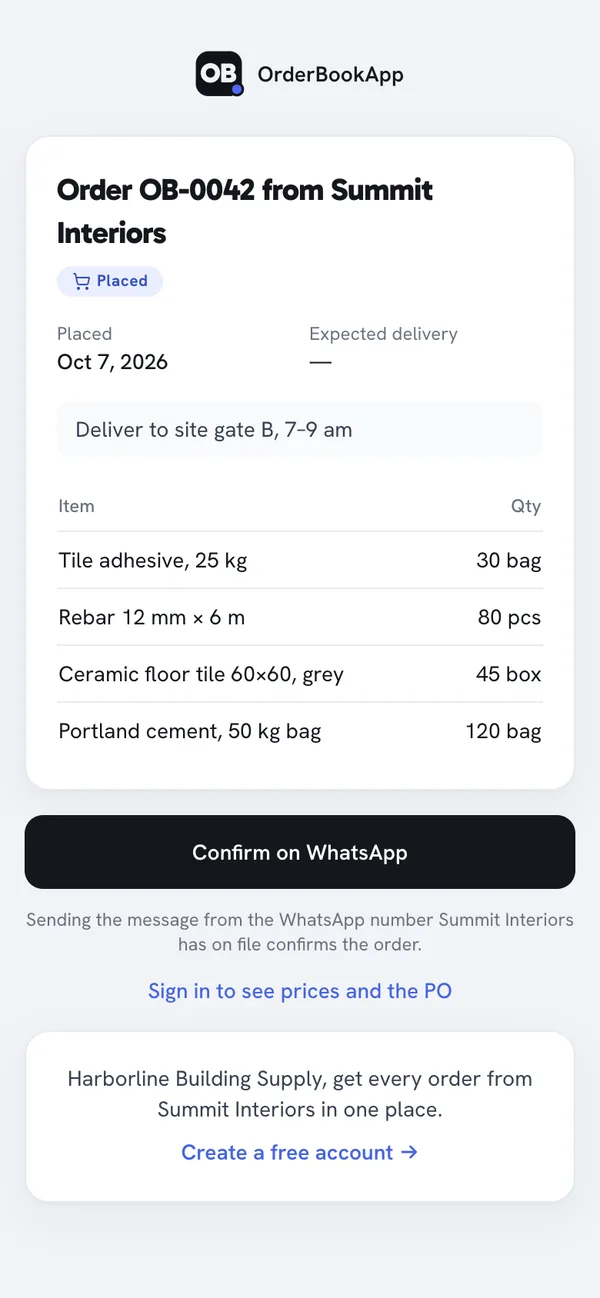
If the supplier doesn’t use the app, you can send them a link to the order. They see the items, quantities and delivery notes without signing up. Prices and the PO stay behind a sign-in. Tapping “Confirm on WhatsApp” sends a short message from their phone. When it comes from the WhatsApp number you saved for that supplier, the order moves to Confirmed. That gives you the written acceptance an LPO needs, without a scanned stamp.
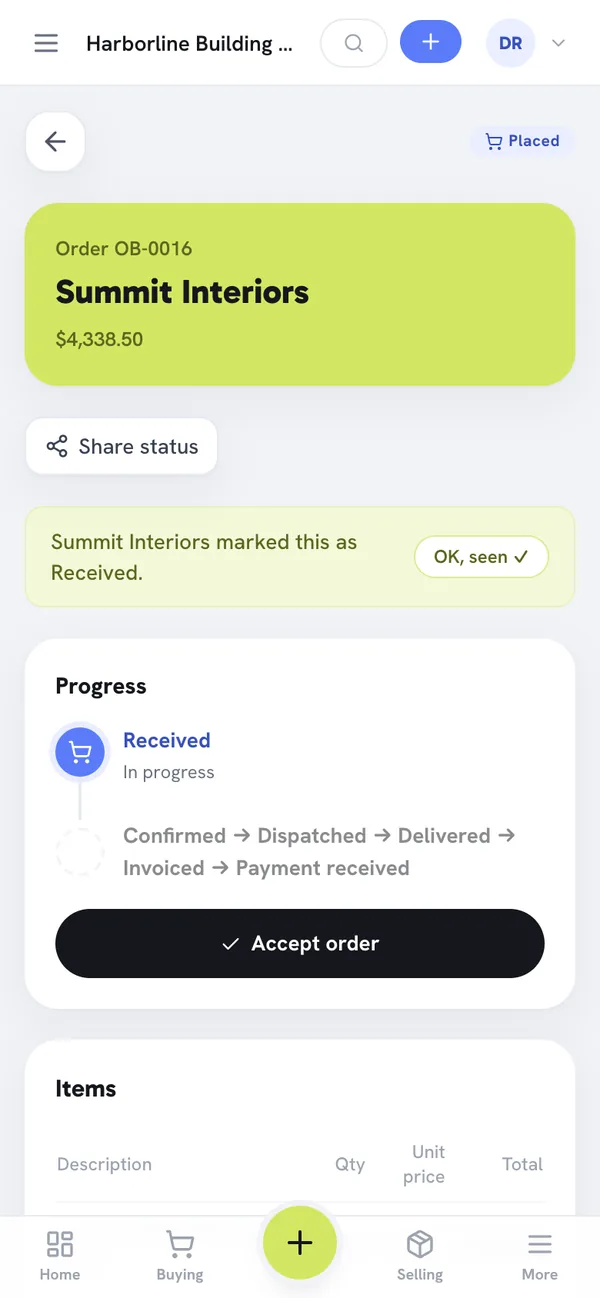
A supplier who does use the app gets the order in their own account and taps “Accept order”. Either way, you can see on the order whether the supplier has accepted, so you don’t have to scroll back through a chat to find out.
Frequently asked questions
What does LPO stand for?
Local purchase order. It is a purchase order sent to a supplier in your own country. The term is common in the Gulf, East and West Africa and parts of South Asia. In most other places the same document is simply called a purchase order or PO.
Is an LPO legally binding?
On its own, an LPO is an offer to buy. Once the supplier accepts it, by signing it, replying in writing or delivering against it, it generally becomes the agreement both sides are held to. The details depend on your country’s contract law and on any terms printed on the LPO, so check with your lawyer or accountant on anything large or disputed.
Who issues an LPO?
The buyer. You raise the LPO, get it approved and send it to the supplier, usually after receiving their quotation. The supplier then accepts it and quotes its number on the delivery note and the tax invoice.
Does an LPO include VAT?
It should show it. List the amount before tax, the VAT rate and VAT amount, and the total, so the supplier knows exactly what you expect to be billed. The LPO is not a tax invoice, though. You reclaim input VAT from the supplier’s tax invoice, not from your LPO.
Can I send an LPO on WhatsApp?
Yes, and many businesses do. Send the PDF rather than a photo of a printed page, quote the LPO number in the message, and ask the supplier to reply that they accept it. Keep that reply with the order. It is your written acceptance.